


PayPal Business
3.89.76K Reviews
App Specs
- Version
- 2025.04.24
- Updated On
- License
- Free
- Downloads
- 10,000,000+
- Developer
- PayPal Mobile
- Categories
- Business
- Platform
- Android, iOS
Screenshots
 Analysis by AppCompare
I find a shared-device scenario is where a business finance app needs the clearest boundaries. Imagine a couple selling handmade items together: one person handles customer messages while the other packs orders, and both need to know whether an invoice has been paid before arranging dispatch. PayPal Business can make the payment side easier to check, but I would treat the phone and the account as belonging to the business operator, not as a general household tool. A shared screen does not make a shared financial identity.
Keep the account tied to the business owner
When setting up access, I’d use the credentials and recovery details of the person responsible for the business account, and I would avoid leaving an active session open on a phone that children or visitors routinely use. That is practical account hygiene, not a claim that the app offers household profiles or family controls. If another adult helps run the business, agree on who checks payments, sends invoices, and follows up with customers before sharing access. Clear responsibilities reduce the chance of two people acting on the same customer request.
For a business that operates as a genuine team, the app may be a useful mobile companion, but I would first decide what each person needs to do and whether a phone is the right place for that work. A bookkeeper who only needs records, for example, may be better served by an agreed desktop workflow or the business’s established accounting process. The app is most appealing when the person holding the phone is also the person making the day-to-day decisions.
Coordinate orders without treating notifications as a ledger
A useful routine is to check the transaction itself before marking an order ready, then keep a separate record of what was sold, shipped, refunded, or still needs attention. Payment alerts are handy prompts, especially when someone is away from a desk, but I would not let a notification become the only evidence that an order is complete. A quick note in the business’s normal order-tracking system can prevent confusion when one household member sees an alert and another is packing the parcel.
Recurring invoices also need a little coordination. They can save repeated billing work for a steady client, but I’d review the amount and timing before relying on an automated schedule, particularly if the service or agreement changes. The convenience is strongest when the charge is predictable; a one-off job with changing materials or hours is better handled with a fresh invoice that reflects the final work.
Age, trust, and the right audience
The app is rated for Everyone, but that content label is not a reason to let a child manage business payments. In my view, its purpose is adult business administration: preparing invoices, checking activity, and making decisions that can affect customer relationships and cash flow. A young family member can help with appropriate tasks such as packing or photographing products without being given access to the account or its financial details.
Trust matters just as much between adults. If a relative helps with orders, share only the information needed to do that job and keep a clear handoff for customer questions, refunds, and invoice changes. The app can support quick checks, but it cannot replace a household agreement about who is authorized to act for the business. That distinction is especially important when personal and business activity are both familiar parts of someone’s PayPal experience.
Worth Reading Before You Choose

EA SPORTS FC Mobile 26 Is a Bigger Football Game, but It Takes Time

Flipboard Shows What News Apps Must Do Beyond the Feed

Switching to Android Auto Means Rethinking Your Driving Routine

Google Calendar Makes a Crowded Week Easier to Manage

Ludo King Makes the Most of the Minutes Between Plans

Baby Panda World Brings Quick Play to Modern Phones, but Its Game Library Feels Busy
Getting Started with PayPal Business
If you’ve ever used PayPal for personal transactions, you’ll find PayPal Business to be a familiar yet enhanced experience. Setting it up is a breeze. You just download the app from either the Google Play Store or Apple’s App Store, log in with your PayPal credentials, and you’re in! The interface is intuitive, clean, and easy to navigate, which is a huge plus when you’re juggling a million tasks at once.
Once you’re in, you’re greeted with a dashboard that displays all your crucial business metrics. From here, you can manage invoices, track payments, and even handle disputes—all without breaking a sweat. The setup process is straightforward, and the app guides you through each step, ensuring you don’t miss a beat.
Features That Make Life Easier
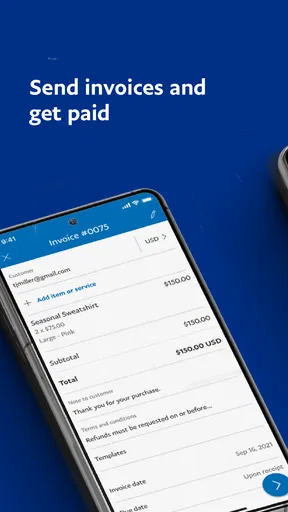
Let’s talk about features because this is where PayPal Business really shines. One of my favorites is the invoice management tool. It’s incredibly simple to create and send invoices directly from the app. You can customize them with your logo, add item descriptions, and even set up recurring invoices for those long-term clients. It’s like having a mini office in your pocket.
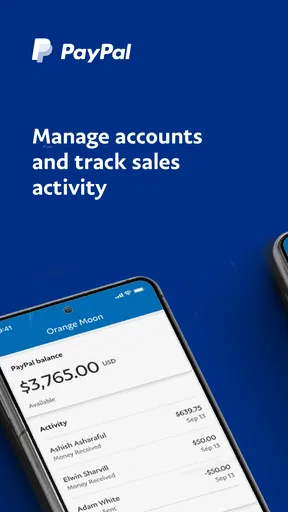
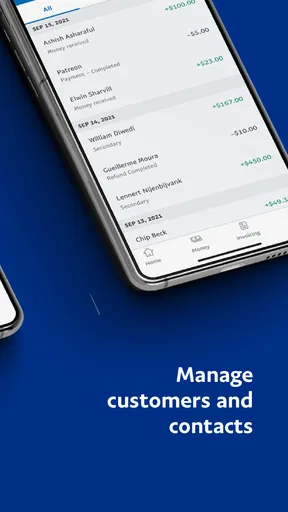
Another standout feature is the payment tracking. You can see all your incoming and outgoing transactions at a glance, which is super helpful for keeping your finances in check. Plus, the app sends you notifications for transactions, so you’re always in the loop.
For those who sell products, the app also offers a product catalog feature. You can upload photos, set prices, and manage your inventory right from your phone. It’s a comprehensive tool that makes selling online or in person much more manageable.
Security and Reliability
In today’s digital age, security is a top priority, and PayPal Business doesn’t skimp on this front. The app uses advanced security measures to protect your data and transactions. It’s reassuring to know that your business information is safe and secure.
The reliability of the app is commendable. I’ve experienced minimal downtime, and transactions are processed swiftly. This is crucial for maintaining customer trust and ensuring they have a seamless experience when dealing with your business.
Customer Support and Community
One of the unsung heroes of any app is its customer support, and PayPal delivers well here. The app offers a help section with FAQs and guides, but if you need more personalized help, their support team is just a call or email away. They’re responsive and knowledgeable, which makes troubleshooting any issues relatively painless.
Additionally, there’s a thriving online community of PayPal Business users. Forums and user groups can be invaluable for sharing tips and tricks or solving common problems. It’s nice to know you’re not alone in navigating the world of digital business transactions.
How it fits into a small-business routine
PayPal Mobile develops this free business app, which sits in the business category and is rated for Everyone. It has an average rating of around 3.9 from about 108,000 ratings, with roughly 9,700 written reviews and over 10 million installs. Those figures suggest that it is widely used, but I would still judge it by whether its payment workflow fits the way you actually sell.
A practical example: a freelance photographer finishes a small job, sends the invoice before leaving the client, and checks later whether payment has arrived. That can be more convenient than returning to a laptop just to bill one customer. A seller with several products can also use the catalog to keep common items handy, while still checking the details of each order before promising stock or delivery. The real benefit is reducing little administrative pauses, not replacing the decisions behind the business.
There are trade-offs. A phone is excellent for a quick invoice or payment check, but reviewing a long run of transactions, reconciling sales against expenses, or preparing formal accounts is usually easier in a dedicated accounting workflow on a larger screen. I’d use the app for immediate customer-facing tasks and keep a separate, consistent record for bookkeeping. That separation makes it easier to catch missing costs and understand profit rather than just money received.
The current version is 2025.04.24, and it runs on Android 6.0 or later. If you are choosing between this and a general invoicing app, the main question is whether you already rely on PayPal for receiving payments. Staying within a familiar payment service can make sending and checking invoices feel direct; a dedicated invoicing or accounting product may suit you better if you need a broader view of taxes, expenses, or reporting. I would not pick either option on the number of buttons alone: choose the one that matches the records you need to maintain.
Small habits that prevent avoidable mistakes
Before sending an invoice, I’d check the customer’s contact details, line descriptions, and total while the job is still fresh in my mind. A polished template is useful, but a saved format can also carry old wording or an outdated amount into a new bill. For repeat work, recurring invoices are a time-saver only when the arrangement is genuinely stable; I’d review them whenever the scope, schedule, or client agreement changes.
For product sellers, the catalog is most useful when its entries stay aligned with the way orders are described elsewhere. Consistent item names make it easier to compare an incoming payment with a packing note or sales record. I would avoid assuming that a catalog alone gives a complete picture of stock across every sales channel. If the same item is sold in several places, update the business’s main inventory record as well so a quick mobile listing does not create a false sense of availability.
When a payment needs attention, separate the customer conversation from the internal decision. First establish what the transaction relates to; then decide whether the next step is fulfilling the order, asking a question, or reviewing a dispute. That small pause is useful because a payment alert can arrive while you are handling something else, and reacting from the lock screen is not the same as checking the full context. It helps keep customer service calm and reduces rushed mistakes.
Who will appreciate it, and who may outgrow it
I’d recommend the app to a solo operator, independent service provider, or small seller who already uses PayPal and wants to send invoices or check business activity while away from a desk. It is especially handy when billing is occasional but time-sensitive: a tutor can bill after a session, or a repairer can send a charge after confirming the completed work. The app’s value is less obvious for a company with several employees, complex approval steps, or detailed accounting needs that require a fuller system.
If your work depends on bespoke estimates, purchase orders, tax workflows, or consolidated reporting across multiple payment providers, compare dedicated business software before making this your central back office. Likewise, if you rarely need to act on payments while away from a computer, the phone app may add little to your routine. It is free to use, but convenience should still be weighed against the time spent maintaining separate records and checking that each transaction is categorized correctly.
Compared with a bank app, this is oriented around PayPal business activity rather than being a full view of every account and expense. Compared with a plain invoice maker, it connects the billing task more closely to payment tracking. Neither comparison makes it the best tool for everyone: a bank’s own business app may be better for a business that wants account balances in one place, while invoicing software may win when document customization and accounting structure matter more than quick PayPal checks.
Household verdict
For a household where one adult runs a small business, I see this as a useful personal work tool, not a shared family finance hub. It can help the responsible person issue an invoice, follow a payment, or check a product listing without opening a laptop, while clear account boundaries keep those actions under the right person’s control. Agreeing on who handles orders and who updates the records is more valuable than letting several people casually pass the phone around.
My overall view is positive for people who want PayPal-focused business tasks within reach and are comfortable keeping their bookkeeping discipline elsewhere. I would skip it as a primary system if the business needs extensive reporting, multi-person oversight, or a single ledger spanning different payment services. Used for what it does well—mobile invoicing and payment management—it can make a small business day feel less interrupted, without pretending that a convenient phone dashboard is a complete accounting department.
Final Thoughts
All in all, PayPal Business is a powerhouse app for managing your business finances. Its ease of use, combined with robust features and strong security, makes it a must-have tool for any business owner looking to streamline their operations. So, if you’re looking to take your business to the next level, give PayPal Business a whirl. It might just be the game-changer you’ve been searching for.
Pros
- User-friendly interface for quick transactions.
- Secure payment processing with encryption.
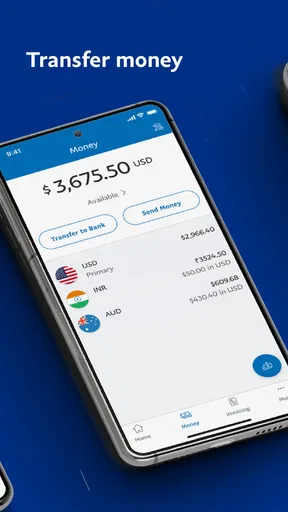
- Supports multiple currencies seamlessly.
- Instant notifications for every transaction.
- Easy integration with e-commerce platforms.
Cons
- Transaction fees can be quite high.
- Limited customer support options available.
- Account holds can occur unexpectedly.
- Complex verification process for new users.
- Customization options are somewhat limited.
FAQs for PayPal Business
What are the main features of the PayPal Business app?
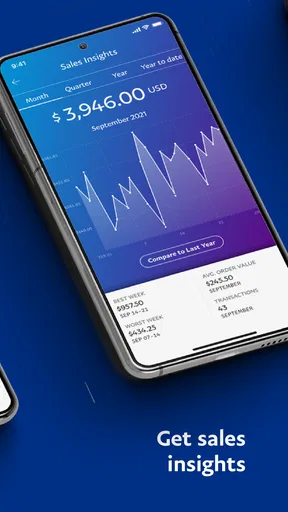
The PayPal Business app offers a range of features designed to facilitate smooth transactions for businesses. These include sending invoices, tracking sales, managing customer data, and accessing real-time transaction updates. Additionally, users can transfer money to their bank accounts, manage disputes, and gain insights into their sales performance through detailed analytics.
Is the PayPal Business app secure for transactions?
Yes, the PayPal Business app is highly secure. It utilizes advanced encryption technologies to protect users’ financial information and transactions. PayPal also offers fraud prevention tools and buyer/seller protection policies. Regular updates ensure that security protocols are up to date, providing peace of mind to business owners and their customers.
Can I use the PayPal Business app internationally?
Yes, the PayPal Business app supports international transactions in multiple currencies, making it ideal for businesses with a global customer base. Users can send and receive payments from over 200 countries, ensuring broad accessibility. However, it's important to check for any specific regional restrictions or additional fees that may apply.
Are there any fees associated with using the PayPal Business app?
While the app itself is free to download, using PayPal Business involves transaction fees. These fees vary depending on the country, type of transaction, and currency conversion involved. It’s crucial to review PayPal’s fee structure on their official website to understand how these might impact your business operations.
What customer support options are available for PayPal Business users?
PayPal provides comprehensive customer support for its Business app users. Support options include a detailed help center, community forums, live chat, and phone support. Users can access troubleshooting guides and FAQs directly within the app, ensuring that assistance is readily available when needed.


